
Understanding How a SOC and a Scanner Help Ensure GDPR Compliance
GDPR compliance rules require companies to implement security measures in accordance with best practices derived from:
- 42 Hygiene Rules and Best Practices from ANSSI (National Cybersecurity Agency)
- Official recommendations from the CNIL (National Commission on Information Technology and Civil Liberties) https://www.cnil.fr/fr/securite-tracer-les-acces-et-gerer-les-incidents
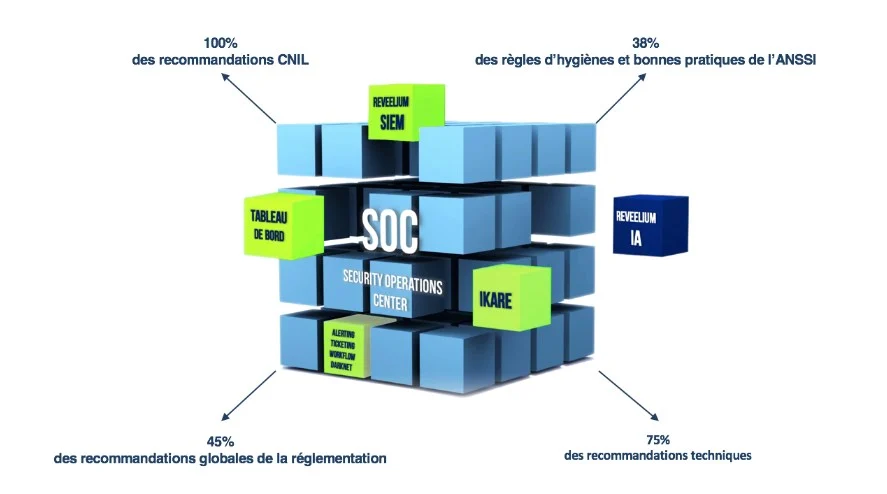
The Reveelium ITrust SOC helps companies achieve regulatory compliance. The coverage rate for the Reveelium SOC is as follows:
The SOC enables a company to achieve GDPR compliance to the extent of:
100% compliant with CNIL regulations,
38% of ANSSI rules
Solutions for Complying with ANSSI Hygiene Rules and Best Practices.
How a SOC and a scanner comply with these rules:
#4: Identify the information and the most sensitive information and maintain a network diagram.
IKare (vulnerability scanner) can help maintain an inventory of the information system and sensitive information using the GDPR tags built into the solution.
#5: Maintain an inventory of privileged accounts and keep it up to date.
Operators at ITrust's Security Operations Center (SOC) are able to identify privileged accounts and continuously verify that they are up to date.
#7: Allow only trusted devices to connect to the organization's network
IKare can help detect when unauthorized devices connect to the Information System.
Reveelium (SIEM/SOC), a behavioral analysis tool, analyzes Active Directory logs to detect malicious behavior related to account operations and network shares.
#8: Identify each person who accesses the system by name and distinguish between user and administrator roles. Logging enabled.
Reveelium, a behavioral analysis tool, analyzes Active Directory logs to detect malicious behavior related to account operations and network shares.
ITrust's Security Operations Center is capable of detecting account-based attacks.
#10: Define and verify rules for selecting and setting password lengths
IKare can help detect common passwords in use on the network.
#12: Change the default authentication credentials on devices and services
IKare detects default passwords on devices and services
#14: Implement a minimum level of security across the entire IT infrastructure.
Despite its somewhat vague name, this rule mainly covers configuration settings (disk encryption, disabling autorun, etc.).
IKare can detect certain configuration errors; in the future, it will improve its configuration scanning capabilities.
#18: Encrypt sensitive data transmitted over the Internet.
IKare can detect the presence of unsecured exchange services or connection interfaces.
#20: Ensure the security of Wi-Fi access networks and the separation of uses.
IKare can scan the security of devices involved in the Wi-Fi network (access points, routers, etc.)
#21: Use secure network protocols whenever they are available.
IKare can detect listening services that do not guarantee the security of transmissions.
#22: Set up a secure Internet access gateway.
IKare can scan the security of this gateway.
#34: Define a policy for updating information system components.
In authenticated mode, IKare can detect obsolescence issues in the vast majority of components (but it does not apply patches).
#36: Enable and configure logging for the most important components.
A contextual analysis of the information system must be conducted, and the following items must be logged: > firewall: blocked packets; > systems and applications: authentication and authorization (successful and failed attempts), unexpected shutdowns; > services: protocol errors (e.g., errors 403, 404, and 500 for HTTP services), traceability of application flows at interconnections (URLs on an HTTP relay, message headers on an SMTP relay, etc.). To achieve this, a security operations center must be established.
#38: Conduct regular security checks and audits, and then implement the corresponding corrective actions.
IKare continuously audits the network and, in particular, helps eliminate obvious vulnerabilities so that auditors can focus on hidden vulnerabilities.
ITrust's SOC enables regular security checks and audits to be conducted so that the necessary corrective actions can be implemented.
#40: Establish an incident management procedure.
ITrust's log correlation engine enables continuous monitoring for any intrusions or malicious activity on the information system.
#42: Prioritize the use of products and services certified by ANSSI
IKare is in the process of obtaining CSPN certification.
ITrust's Solutions in Response to the CNIL Guidelines on Personal Data Security.
How ITrust complies with these rules:
#Handout 1: Raising User Awareness
GDPR training provides an opportunity to review the new rules and learn about the tools that will be mandatory starting in May 2018, so that your organization can begin the compliance process as soon as possible.
This training is intended for CILs, DPOs, CIOs, CISOs, and Quality and Compliance Managers.
ITrust's training programs are structured in three levels:
1 – The Basic Rules of Personal Data Protection in the Context of French and International Regulations.
Concepts of Privacy and Personal Data
– Regulatory sources (the French Data Protection Act, the General Data Protection Regulation, etc., and an overview/comparison of regulations around the world).
– Fundamental Principles of the Data Protection Act.
– The CNIL and its inspections.
2- The General Data Protection Regulation
– Overview of the GDPR
– Scope of the GDPR: Data, Individuals, Fundamental Principles
– Key Obligations
– Main Penalties
– Data Breach Management
– Data Protection Officer (DPO): Legal Framework (Appointment, Responsibilities) and Implementation (in Practice)
– PIIA (Privacy Impact Assessment)
3- Incorporate new developments into your structure (workshops).
– What are the most important rules?
– How do you transfer personal data outside the EU?
– How should we respond in the event of a data breach?
– Overview of the ITrust Support Program
#Worksheet 2: Authenticating Users.
IKare maps the entire information system to detect devices connecting to the system that are not part of it. It detects access and authentication protocols (SSH, SMTP, FTP, etc.).
Reveelium, a behavioral analysis tool, analyzes Active Directory logs to detect malicious behavior related to account operations and network shares.
#Worksheet 3: Managing Authorizations.
Reveelium, a behavioral analysis tool, analyzes Active Directory logs to detect malicious behavior related to account operations and network shares.
ITrust's Security Operations Center is capable of detecting account-based attacks.
#Sheet 4: Tracking Access and Managing Incidents. (See CNIL recommendations)
ITrust's SOC enables the logging of access events and the establishment of procedures for managing incidents so that the organization can respond in the event of a data breach (compromise of confidentiality, integrity, or availability).
#Worksheet 5: Securing Workstations.
#Handout 6: Securing Mobile Computing.
#Worksheet 7: Protecting the Internal Computer Network.
#Worksheet 8: Securing Servers.
#Worksheet 9: Securing Websites.
IKare automatically maps the entire network. The solution assigns a severity score and provides the corresponding fixes. It identifies vulnerabilities and outdated software on most devices and applications, including firewalls, servers, desktop operating systems, printers, wireless devices, and many other components.
Reveelium, a behavioral analysis engine, detects persistent threats, malicious behavior, and viruses that bypass existing security defenses (firewalls, antivirus software, etc.).